
The Party Breakdown tab presents congressional disclosure activity broken down by party and chamber. It includes four summary tiles at the top — total trades, volume, number of active politicians, and top sector — followed by four sections:
- Sector Allocation Heatmap: Sector distribution of disclosed trades by party and chamber.
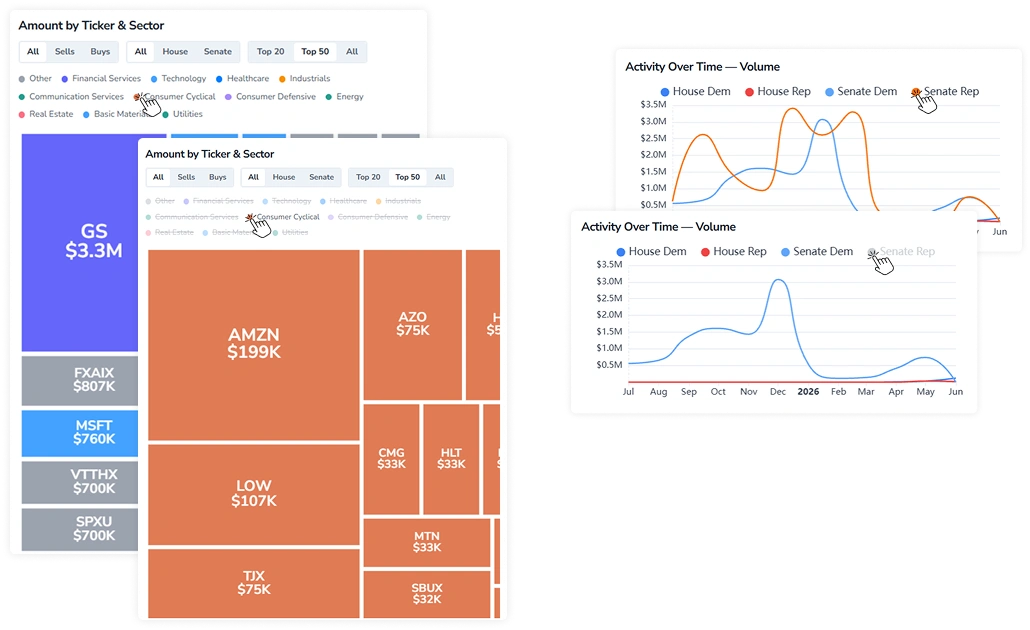
- Amount by Ticker & Sector: Disclosed volume by asset across the full ticker universe.
- Activity Over Time — Volume: A chart showing disclosed volume trends over the selected period, broken down by House Democrat, House Republican, Senate Democrat, and Senate Republican.
- Sector Rankings: A table ranking sectors by total disclosed volume, with party and chamber breakdown.
The tab includes a Filters panel at the top, which applies to all sections. It contains a date range picker. The panel is sticky and can be collapsed using the arrow in the top-right corner.
1. Key Behaviors
Sections in the tab share the following interactive features.
1.1. Tooltip on Hover
Hovering over any element across all three charts — a heatmap cell, a treemap tile, or a line — displays a tooltip with the corresponding label and value.
1.2. Toggling Legend Items
The Amount by Ticker & Sector and Activity Over Time sections include an interactive legend with party/sector names and colored indicators. The behavior differs between the two:
- Amount by Ticker & Sector: Press a legend item to isolate the corresponding group. Press again to restore the full view.
- Activity Over Time: Press a legend item to remove the corresponding line from the chart. Press again to restore it.
2. Sector Allocation Heatmap Controls
The Sector Allocation Heatmap displays sector distribution of disclosed trades by party and chamber. The view can be adjusted using the following controls:
- Grouping: Switch between Party, Chamber, and Party + Chamber to set the row breakdown.
- Metric: Switch between Volume %, Absolute, and Trades to change the values displayed in each cell.
- Scope: Limit the tickers included in the calculation to the Top 50, Top 200, or Top 500.
- Include ETF/Funds toggle: Include ETFs and mutual funds in the sector breakdown.
3. Amount by Ticker & Sector Controls
The Amount by Ticker & Sector section displays disclosed volume by asset as a treemap. The view can be filtered using three toggles:
- Transaction type: Filter by All, Sells, or Buys to display total disclosed volume, sell-side only, or buy-side only.
- Chamber: Filter by All, House, or Senate to display disclosures from all members, House members only, or Senate members only.
- Ticker count: Limit the number of tickers displayed in the treemap to the Top 20, Top 50, or All.
Press a ticker tile to navigate to the corresponding ticker page.
4. Sector Rankings Table
The table displays sectors ranked by total disclosed volume, with party, chamber, transaction count, top ticker, and top politician for each entry. A few columns have additional behaviors:
- The Party column uses color coding: REP (Republican) in red, DEM (Democrat) in blue, IND (Independent/Not specified) in grey.
- Press a ticker in the Top Ticker column to navigate to the corresponding ticker page.
The table supports standard column sorting (see the Sorting Guide) and pagination.