
FinImpulse is an API-first financial data platform for stocks, ETFs, and mutual funds. Its REST API provides current and historical market data, company financials, analyst coverage, ownership and options data, macroeconomic indicators, and more.
The FinImpulse web app at app.finimpulse.com includes a dedicated API Mode for using and managing the API. It contains the following sections available in the left sidebar:
- Dashboard🡽: View the account balance, number of API tokens, monthly usage, and resources.
- API Settings🡽: Manage API tokens, IP whitelists, and daily limits.
- Usage🡽: Track expenses and review each successful API request.
- Errors🡽: Review failed requests and their error messages.
- Playground: Coming soon.
From the sidebar, you can also access the FinImpulse API documentation by pressing Documentation.
1. Accessing API Mode
To open API Mode:
- Sign in at app.finimpulse.com. To create an account, refer to the Sign-Up Guide↗.
- In the Mode switch at the top of the left sidebar, press API Mode.
The sidebar can be collapsed by pressing the Collapse menu button at the bottom.
2. Dashboard
The Dashboard is the starting page of API Mode.
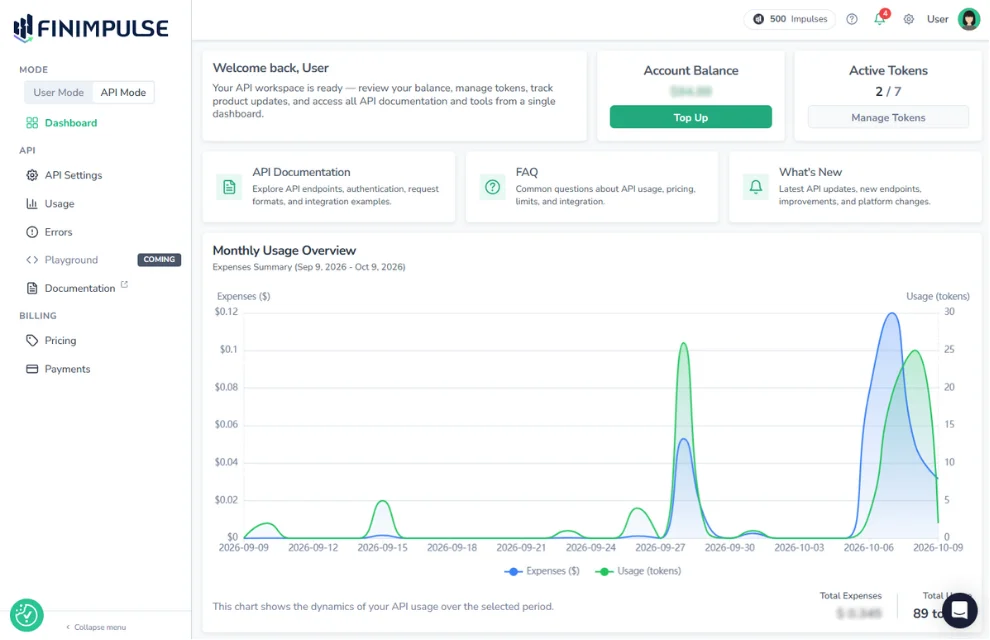
It shows key account information and provides one-click access to other sections and resources:
- Account Balance: The balance available for API requests.
- Active Tokens: The number of active API tokens out of all tokens on the account. Learn how to create and manage tokens↗.
- Resources: Links to the API documentation, FAQ, and Articles & Updates.
- Monthly Usage Overview: A chart of your daily API activity for the last 30 days.
For detailed usage data for any date range, as well as a list of all successful API requests and their results, go to the Usage page. Learn more in the Usage guide↗.