

Slack Price Alerts
Description
Create a no-code workflow that monitors selected stock, ETF, or fund prices and sends alerts to Slack when a defined condition is triggered. The workflow can run on a schedule, request current prices from FinImpulse, check each result against your rules, and publish a formatted message into a Slack channel.
This setup is useful for teams that want simple market data alerts without building a custom notification system. You can track a watchlist, monitor internal coverage lists, follow selected ETFs, or notify a team when a price moves above or below a configured level.
The alert rules can be stored in Google Sheets, Airtable, or directly inside the workflow. A basic version can check whether the latest price is above or below a fixed threshold. A more advanced version can compare the latest price with a previous value and send alerts based on daily change, percentage change, or selected market status.
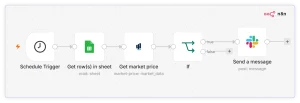
The workflow can be built in either n8n or Make. In both versions, the structure is similar: start with a scheduled trigger, read the list of symbols and alert rules, request current prices from FinImpulse, apply a condition, and send a Slack message only when the condition is true.
Interface Example
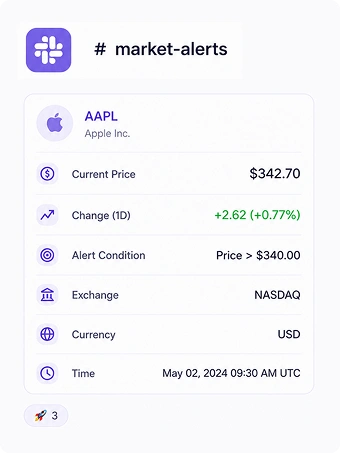
Output Example
Tesla (TSLA) price alert
Price: 301.00 USD
Change: -2.09% (threshold: 300 USD)
XOM $158.02 (+3.25%) — above threshold $150
Portfolio  Alert
XOM  — 158.02 USD, +3.25% (thr: 150)
Price alert: Chevron (CVX)
Price: 192.58 USD (+5.00, +2.67%)
Market: REGULAR session
Threshold: 185 USD
Updated: 2026-07-29 15:23 UTC
How to Build this Workflow
This workflow is built with the following tools:
- n8n or Make
- Slack
- FinImpulse’s Get Market Price action
- Google Sheets or Airtable
Workflow steps:
- Add a scheduled trigger to run the workflow at selected intervals.
- Read symbols and alert rules from Google Sheets, Airtable, or a static workflow table.
- Send each symbol to FinImpulse Market Price API.
- Compare the latest price with the configured rule.
- Continue only when the condition is met.
- Format the Slack message with symbol, price, change, threshold, currency, exchange, and timestamp.
- Send the message to a selected Slack channel.
Optional extensions:
- Add Search Assets (Lite) to validate symbols before creating alerts.
- Add Get Asset Summary (Lite) to include company name, sector, industry, country, or logo.
- Store triggered alerts in Google Sheets or Airtable for audit history.
- Add separate Slack channels for different watchlists, sectors, or teams.
Resources
- n8n or Make integration
- Slack Integration
- FinImpulse API Documentation
- API Pricing
Disclaimer. FinImpulse provides financial data and analytics APIs only. This workflow does not provide investment advice, trading recommendations, or guarantees about market outcomes.