

Google Sheets Price Updates
Description
Create a scheduled no-code workflow that keeps a Google Sheets watchlist updated with fresh market price data. The workflow reads symbols from a spreadsheet, sends each symbol to FinImpulse Market Price API, and writes the latest available values back into the same sheet.
This setup is useful when you need a simple market data layer inside Google Sheets without writing scripts, maintaining imports, or copying prices manually. It can support daily watchlists, asset trackers, reporting sheets, internal dashboards, and recurring client-facing reports.
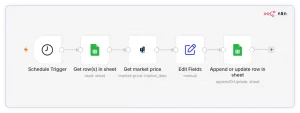
The workflow can be built in either n8n or Make. In both versions, the logic stays simple: start with a scheduled trigger, read symbols from Google Sheets, request current price data from FinImpulse, map the response fields, and update the relevant spreadsheet rows.
A basic version can update only the latest price and daily change. A more advanced version can also store currency, exchange, market status, timestamp, and historical daily snapshots by appending a new row each day instead of overwriting existing data.
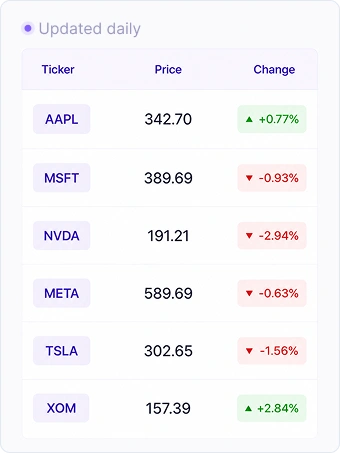
Interface Example
Output Example
|
Ticker |
Asset Name |
Price |
Change % |
Currency |
Market State |
|---|---|---|---|---|---|
|
AAPL |
Apple |
342.70 |
-1.35% |
USD |
REGULAR |
|
MSFT |
Microsoft |
389.69 |
+5.53% |
USD |
REGULAR |
|
NVDA |
NVIDIA |
191.21 |
+1.87% |
USD |
REGULAR |
|
META |
Meta Platforms |
589.69 |
+5.87% |
USD |
REGULAR |
|
TSLA |
Tesla |
302.65 |
+2.19% |
USD |
REGULAR |
|
MCD |
McDonald’s |
272.06 |
+0.18% |
USD |
REGULAR |
|
PG |
The Procter & Gamble Company |
144.69 |
+1.08% |
USD |
REGULAR |
How to Build this Workflow
This workflow is built with the following tools:
- n8n or Make
- Google Sheets
- FinImpulse’s Get Market Price action
Workflow steps:
- Add a scheduled trigger to run the workflow once per day.
- Read symbols from a Google Sheets column.
- Send each symbol to FinImpulse Market Price API.
- Map the API response fields to spreadsheet columns.
- Update existing rows or append a new daily snapshot.
- Optionally add error handling for empty symbols, unavailable assets, or failed API responses.
Optional extensions:
- Add Search Assets (Lite) if users need to validate or resolve symbols before requesting prices.
- Add Get Asset Summary (Lite) if the sheet also needs company name, sector, industry, country, or logo.
- Add Slack or email notifications when a selected price condition is met.
Resources
- n8n or Make integration
- Google Sheets Integration
- FinImpulse API Documentation
- API Pricing
Disclaimer. FinImpulse provides financial data and analytics APIs only. This workflow does not provide investment advice, trading recommendations, or guarantees about market outcomes.